Organize your files
Create a simple information structure so files, records, photos, notes, and documents can be found again when they matter.

OAK Method article
Organize your files, Assemble your stack, and Keep your data. O.A.K. is a practical design framework for information technology: a way to make technology decisions around information instead of around gadgets.
Create a simple information structure so files, records, photos, notes, and documents can be found again when they matter.
Choose hardware and software as a working system, guided by desired outcomes instead of novelty or brand preference.
Protect the information itself with backup, recovery, migration, retention, lifecycle planning, and durable export habits.
Modern technology changes constantly. Computers, phones, apps, interfaces, subscriptions, compatibility requirements, security practices, and cloud services keep shifting. Most people experience that change as noise: new tools arrive before the old ones feel settled.
O.A.K. starts from a steadier premise. Technology is primarily a way of working with information. The tools change, but the human task remains familiar: capture information, find it again, use it with the right tools, and preserve it over time.
That is why O.A.K. is not a folder trick, a shopping list, or a backup checklist. It is a simple information-technology framework for individuals and small offices that need a calmer way to make technology decisions.
Digital storage does not organize itself. Easy folder creation can make the problem worse because people bury useful information under endless nested folders, vague names, duplicated exports, and app-specific hiding places.
Organize means making information findable. The goal is not decorative tidiness. The goal is future access, recall, and reuse under real-life pressure.
Deadline-bound work that is actively moving toward completion.
Ongoing responsibilities such as taxes, medical records, insurance, reports, or operations.
Reference material organized by topic, theme, research interest, or learning path.
Inactive material retained from projects, areas, and resources once it no longer needs daily attention.
PARA, popularized by Tiago Forte, is a useful default because it is simple, flexible, and repeatable across file systems, computers, apps, and services. O.A.K. also emphasizes thoughtful naming and shallow folder depth. A file structure that requires five hidden clicks and a perfect memory is not really organized.
Your stack is the collection of hardware and software you use to work with digital information. It can include computers, phones, monitors, storage, routers, Wi-Fi, cloud services, office software, backup software, automation tools, and AI systems.
Assemble means looking at those parts as a working system. Instead of starting with a specific laptop or app, start with the information you are responsible for, the outcomes that matter most, and the tools that help you work with that information reliably.
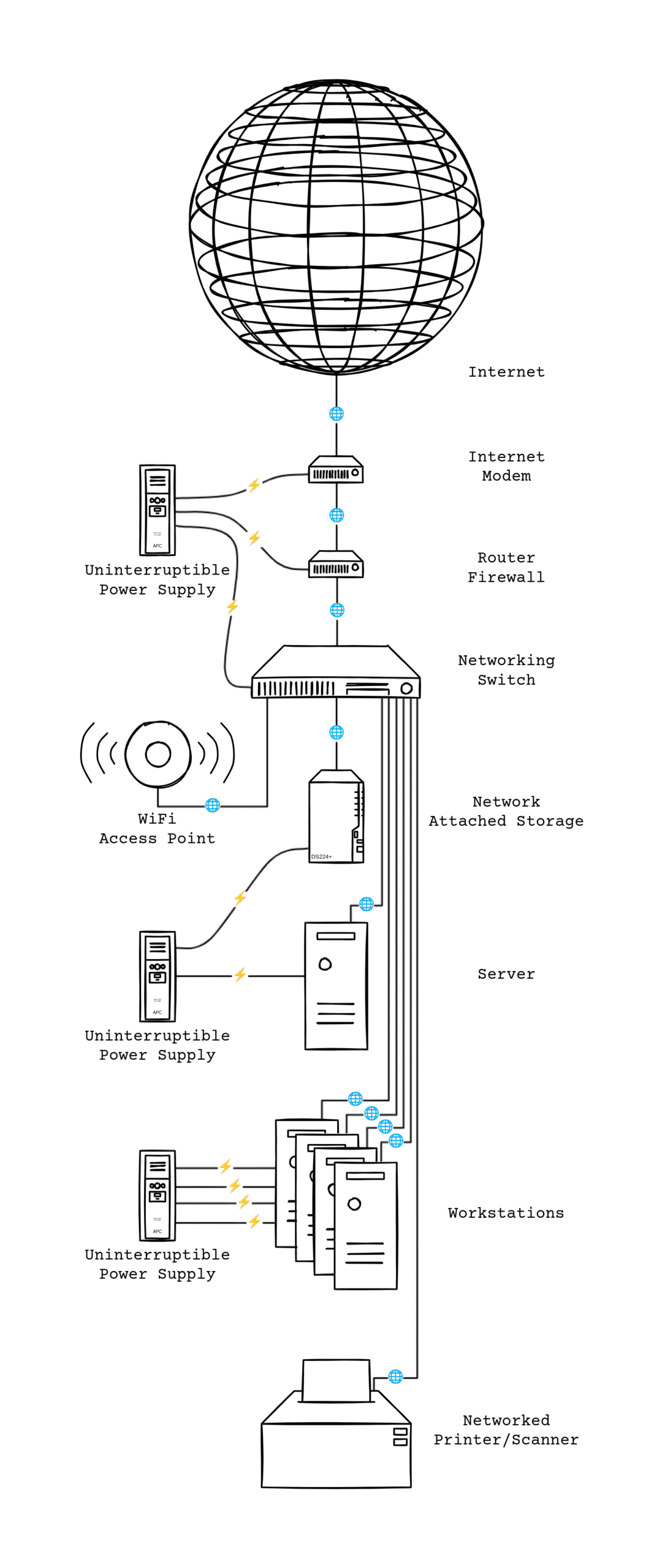
Example: Assemble in practice. This small-office hardware map is an example of the Assemble pillar, not the whole O.A.K. Method.
Prioritization belongs here. Desired outcomes require choices because time, money, attention, space, and support capacity are limited. A practical roadmap is to name the desired outcomes, rank them, explore the types of tools that can serve them, assemble the stack, and review it on a regular lifecycle.
Keep is the continuity layer. If technology is about information, then the data is the point. Devices fail. Apps disappear. Accounts get locked. Formats age. Companies change terms or shut down services. A serious technology system has to assume failure before failure happens.
The minimum answer is a reliable backup system. For O.A.K., that system has four parts:
The software or service that manages the backup process.
The device, drive, folder, account, or system where the original data lives.
The storage location where backup copies are saved.
The rules for timing, method, versions, retention, encryption, and related behavior.
Good keeping practices can include 3-2-1 backup thinking, restore testing, off-site copies, storage refresh cycles, lifecycle replacement, and non-proprietary exports where possible. The purpose is not to collect backup tools. The purpose is to make sure the data can survive accidents, user error, device replacement, service loss, and time.
The three pillars work together. Organize answers where the information lives and how it will be found. Assemble answers which tools help create, access, move, and use that information. Keep answers how the information will survive failure, replacement, and obsolescence.
The method is not strictly linear. Organization changes as life and work change. Stacks evolve as tools age or better options appear. Keeping practices must be reviewed as data grows and risks shift. O.A.K. gives those changes a stable pattern.
Next step
Start with the short method page, or move into an assessment when the files, stack, and data risks need a practical review.